How to Make a Times Square Billboard Video With AI (One Photo)
 ReelBoop
A step-by-step guide to turning one photo into a Times Square billboard clip with AI: which photo to pick, what the generated camera actually does, and how to share it.
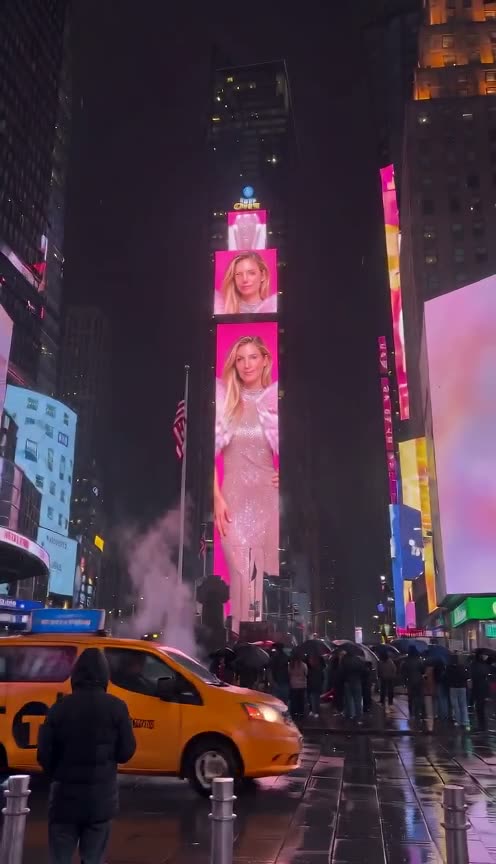
You do not need a billboard rental, a designer, or a video editor. You need one photo and about a minute. This guide explains what the template actually produces, how to pick a photo that survives the shot, and what to check before you share it.
Want to skip the reading? Open the Times Square billboard generator and start with one photo.
What you are actually making
The template recreates a specific shot: the camera opens close on a pink-feather top, then pulls back across a rainy Times Square at night, and your photo appears on a giant LED screen above the street. Neon signage, wet asphalt reflections and pedestrians stay in frame.
It is an AI simulation of that scene. It is not a real billboard booking in New York, and nothing is displayed on an actual screen.
Step 1: Pick the photo
- One adult, face visible. A front-facing portrait or half-body shot works best. The opening shot is a close-up, so the face carries most of the resemblance.
- Even light. Avoid backlit silhouettes, heavy shadow across the face, or strong colour casts.
- No group photos or distant full-body shots. The face has to survive being scaled onto a screen.
- Use a photo you own, or one you have permission to use. Do not upload someone else's portrait.
Step 2: Generate
Open the Times Square billboard template, upload the photo and press generate. One film costs 60 credits and runs about 10 seconds at 480p, 9:16.
Generation keeps the source camera move and timing, but small detail — hands, passers-by, individual rain streaks — varies between runs. That variance is normal for generated video, not a defect.
Step 3: Download and share
The finished clip plays and downloads as an MP4 in your private creations, with the source soundtrack already on it. If you want different music, swap the audio track in any editor; the video itself does not change.
Vertical, ten seconds and silent-friendly: it drops straight into TikTok, Instagram Reels and YouTube Shorts.
What makes it read as real footage
Three things do most of the work, and they are worth checking in your own result:
- The camera behaves like a phone. It drifts slightly and reframes the way a hand-held take does, instead of gliding like a commercial.
- The face keeps its identity across the pull-back rather than melting into a generic model face.
- The street stays busy. Lights, wet ground and moving pedestrians give the eye the cues it expects from real footage.
Common questions
Can I do this without editing skills? Yes. Upload, generate, download. No timeline, no keyframes.
How much does it cost? One film is 60 credits. Confirmed failures return the credits.
Is the billboard real? No. It is a generated scene, not a booking on a real Times Square screen.