
Higgsfield vs Pollo AI
Both Cinema workspaces let you set the lens and lighting for a photo-to-video shot. Higgsfield lets you save the product as a reusable Element. Pollo Cinema lets you pick the framing in its camera controls.


Cinema Studio vs Pollo Cinema
| Workflow | Higgsfield | Pollo AI |
|---|---|---|
| Camera & pace | Set the lens and aperture. Use Single shot tempo for a continuous push-in. | Set the lens, aperture, framing and movement in Pollo Cinema. |
| Product reference | Add a product photo as a reference. Save it as an Element to use again. | Add the photo to the scene and call it out with an @ reference. |
| 10 s at 720p | 70 credits for 16:9 with audio in the October 2026 Cinema Studio guide. | Check the quote in Pollo Cinema with the same length, resolution, aspect ratio and audio. |
One product photo, two ways to direct it
Say you have a photo of a silver drink can and need a 10-second shot for a launch page. The can stays still. The camera pushes in, a soft highlight moves across the metal, and the shot ends with space for a headline. Use a well-lit front three-quarter photo, with the entire can visible against a plain background.
A silver drink can stands upright on dark slate. Hold on the full can for the opening beat. Push in slowly as a soft side light travels across the aluminum. End on the full can, with clear space on the right for a headline. Keep the silhouette and proportions consistent with the reference photo for the entire shot.
Aim for the same clip length, 16:9 frame, 720p export and audio setting on both platforms. For an audio-enabled comparison, specify quiet room tone on both. For a silent placement, switch sound off on both where available and compare that setting separately from the audio-on quote below.
Higgsfield Cinema Studio 4.0
Upload the can through References. In Film setup, pick Single shot if the move should be continuous. Open Camera to set the camera body, lens and aperture. For a straightforward product shot, start with a clean lens and enough depth of field to keep the rim and label readable. Use Lighting for the side light and describe the timing of the push-in in the prompt.
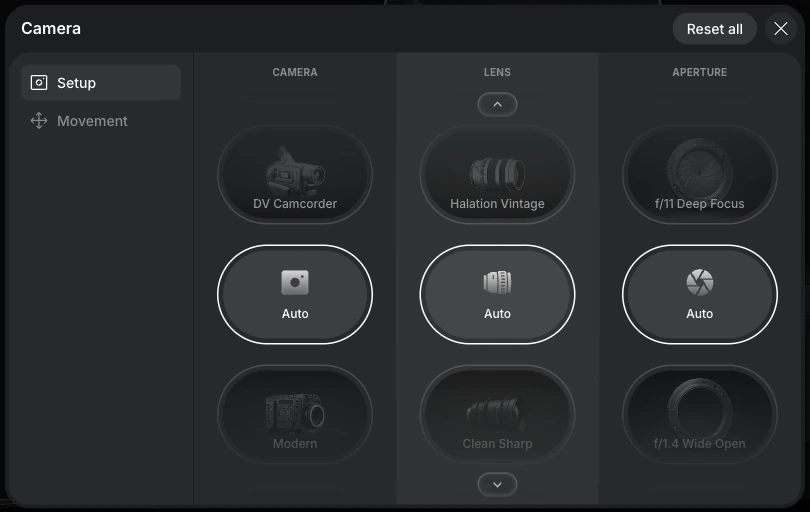
If a second shot uses the same product in a different scene, save the photo as an Element and recall it from the picker. Keep the product reference fixed and change the location or lighting one at a time. Higgsfield’s guide to reusable Elements
Pollo Cinema
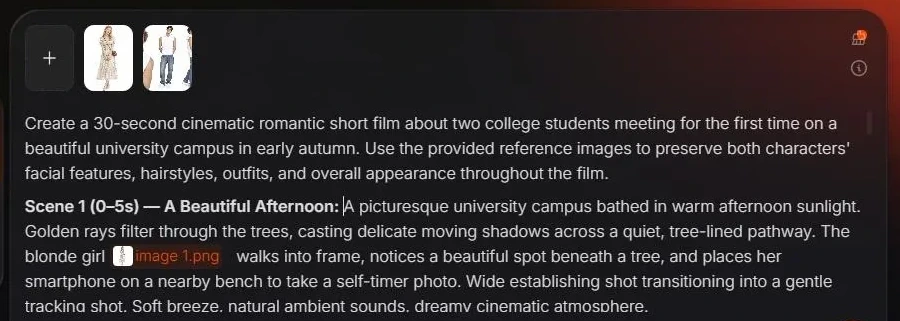
Add the product photo with the + button. Type @ in the prompt and choose the uploaded photo to insert its tag. Use that tag in the sentence that defines the subject. For example, “Use [selected photo] for the can’s silhouette and finish. Place the can on dark slate.”
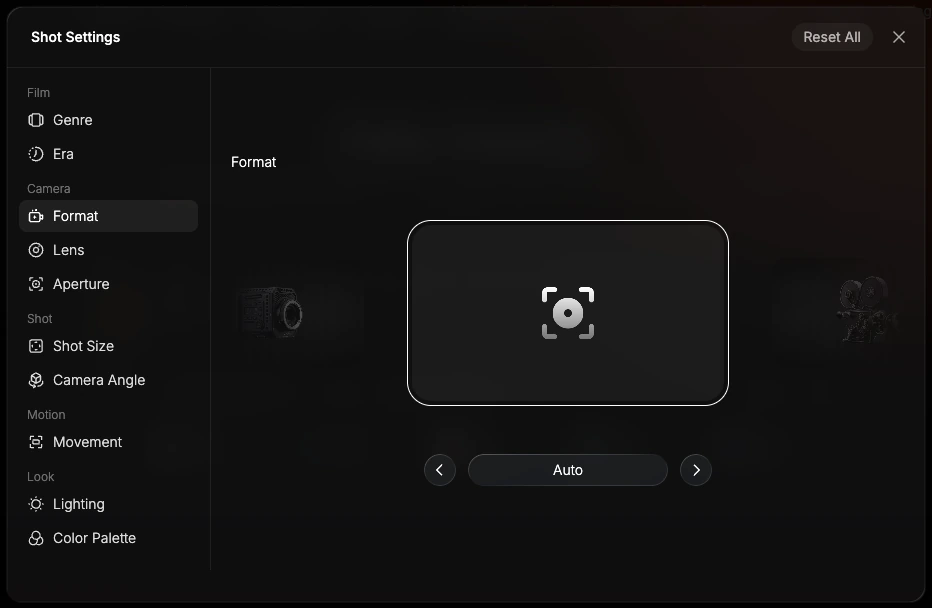
Then open Shot Settings. Use Shot Size to keep the entire can in frame, Camera Angle to match the reference perspective, and Movement to set the push-in. Start the remaining controls on Auto. If the first take crops the rim, adjust the shot size before changing the lens or rewriting the prompt.
If you want to compare video models
Open Higgsfield Image to Video or Pollo Image to Video. Choose two models in the same workspace and give them the same photo, prompt and available output settings. If the budget allows, run each model twice and check whether the same issues recur.
How to judge the clips
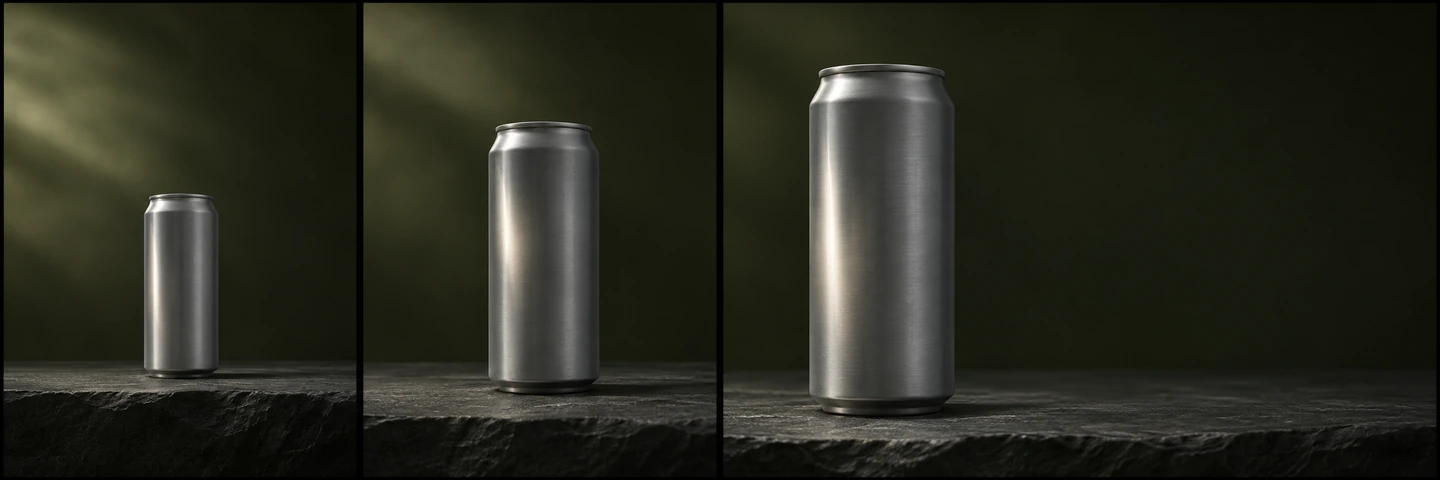
- Opening. Both the rim and the base should be visible. The tabletop edge gives you a fixed point for judging the move.
- Midpoint. The can should grow on screen as the camera approaches. Check that the rim stays round and that the highlight travels across the metal smoothly.
- Final frame. Check that the silhouette is intact and try overlaying your real headline. For a vertical version, reframe for 9:16 and repeat this check before export.
If the lettering on the can matters, test with the actual label and zoom in on the first and last frames. Keep the campaign headline as a separate layer so you can edit it for each placement.
Compare the cost of a usable clip
Higgsfield’s October 2026 guide lists 70 credits for one 10-second, 720p, 16:9 Cinema Studio 4.0 generation with native audio. Its example puts those credits at US$3.43 using a US$49 allocation of 1,000 credits. That was the guide’s example rate. Use your current plan and the quote beside Generate to price the shot today. Higgsfield’s published cost example · Higgsfield plans
For Pollo, take the credit quote in the actual workflow, with the same resolution, length, sound and output count. Pollo Cinema and a selected model in Image to Video are separate quotes. Verify the first payment, renewal date and included credits on the applicable plan. If you only need one clip, check how to cancel and what happens to unused credits. Pollo says its subscription credits expire at the end of the billing cycle. Pollo plans and credit terms
For example, if your account quotes 70 credits per attempt and you expect three attempts, budget 210 credits for one accepted clip. Multiply by your plan’s price per usable credit to estimate the share of the subscription consumed. Keep the amount charged at checkout on a separate line. If an eligible plan covers that generation under an unlimited allowance, check the exact model, resolution and queue conditions instead.
Questions before you subscribe
Is Higgsfield better than Pollo AI for camera movement?
Start with Higgsfield if you want a dedicated setup view for the camera body, lens and aperture. Start with Pollo if you prefer shot size, camera angle and movement in one panel. When you review the clips, look for repeatable framing and push-in speed.
Can both start with one photo?
Yes. A clean product photo is enough to set up the shot in both cinema workflows. If close-ups show a side the original photo hides, add a matching side image as an appearance reference to reduce guesswork.
Which is cheaper for making one clip?
The answer depends on the generation quote, the first payment and how many attempts meet your brief. Compare the same output in both accounts. If you only need one clip, the first payment matters more than the credit rate you would get by using every credit in a subscription.
What if I need TikTok and a landscape website video?
Decide which version matters most and stage your composition around that frame. For a 9:16 cut, give the top and bottom room for overlays and keep the product near the vertical center. Verify resolution, sound and credit cost again when you change the aspect ratio.
Can I use the result in an ad?
Check the chosen plan’s commercial use terms and export watermark rules, and verify you have rights to the product photo, people, audio and marks used in the ad. Confirm those conditions with the provider before delivering it to a client. Higgsfield terms · Pollo plans
ReelBoop editorial. Workflows checked against both providers’ documentation on November 18, 2026.
Related guide: AI video camera movement prompts.