
Continuity Editing: How to Match Action Between Shots
 ReelBoop
Learn how to cut on action, match eyelines, and keep screen direction clear. Follow a package handoff example and fix common continuity errors.
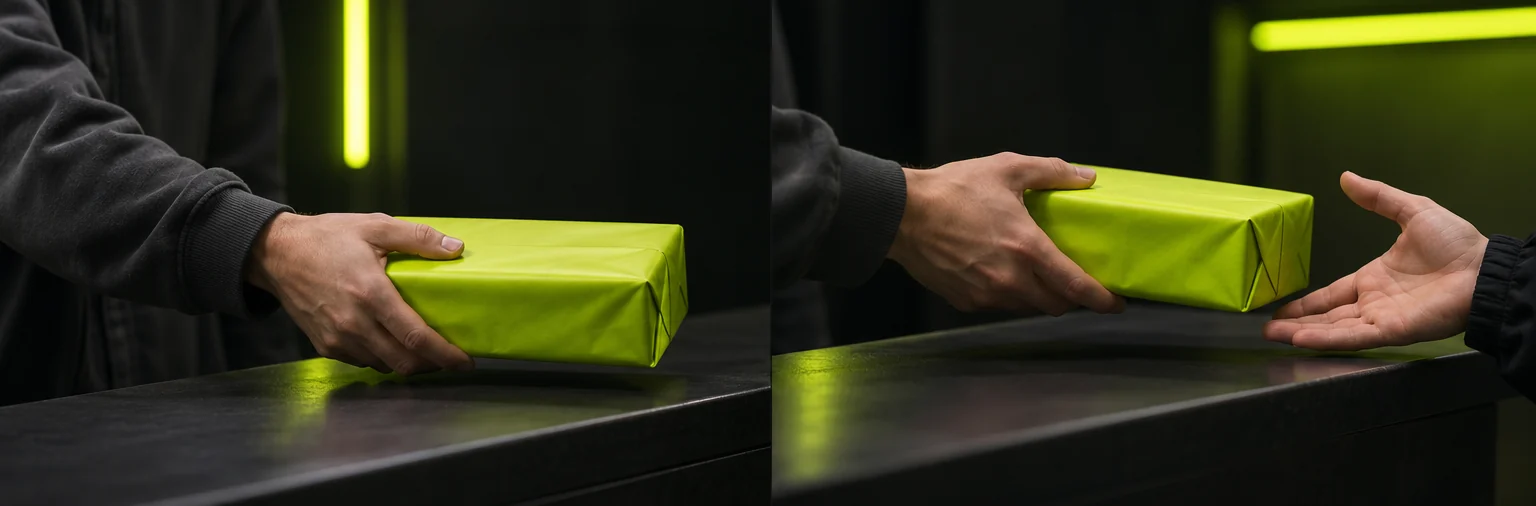
Continuity editing makes shots from different angles feel like parts of the same event. For a package handoff, start with a wide shot that shows who is on each side, cut to a close-up as the receiver takes the weight, and show the courier letting go. Check the box position, hand contact, and direction on both sides of the cut. Oklahoma State University’s guide to film editing
Establish who is where
Imagine a courier on frame left and a shopkeeper on frame right. In the wide shot, the parcel moves left to right across the counter. Draw a line between the two people and keep the wide shot and the close-up camera on the same side of that line. This is the 180-degree rule. It gives the audience a stable view of who is facing whom and which way the box is going. If you need to cross the line, establish the new positions in a wide shot from the new side or show the camera moving across the line. Adobe’s continuity editing guide
A look can tell the audience where to pay attention next. If the courier glances down and right, a close-up of the shopkeeper’s fingers reaching under the box completes the glance. For a look between the two people, the courier looks right and the shopkeeper looks left. Check the direction and height of each glance against the wide shot. Oklahoma State University’s examples of eyeline matching
Cut as the receiver takes the weight
Put the wide shot and the close-up in your editor. In each clip, mark four beats: the courier extends the box, the shopkeeper touches it, both people support it, and the courier releases it. Use those markers to find where the close-up can continue the motion. Different takes can reach the same beat at different source times. Astorie’s two-angle cup pickup example
End the wide shot just as the shopkeeper’s fingers reach the underside. Start the close-up as those fingers settle and the box keeps moving right. Leave enough of the close-up to show the courier’s hand withdraw. If the close-up starts with a gap between the fingers and the box, the audience sees the shopkeeper reach twice. If it starts after the courier has let go, the moment of transfer disappears.
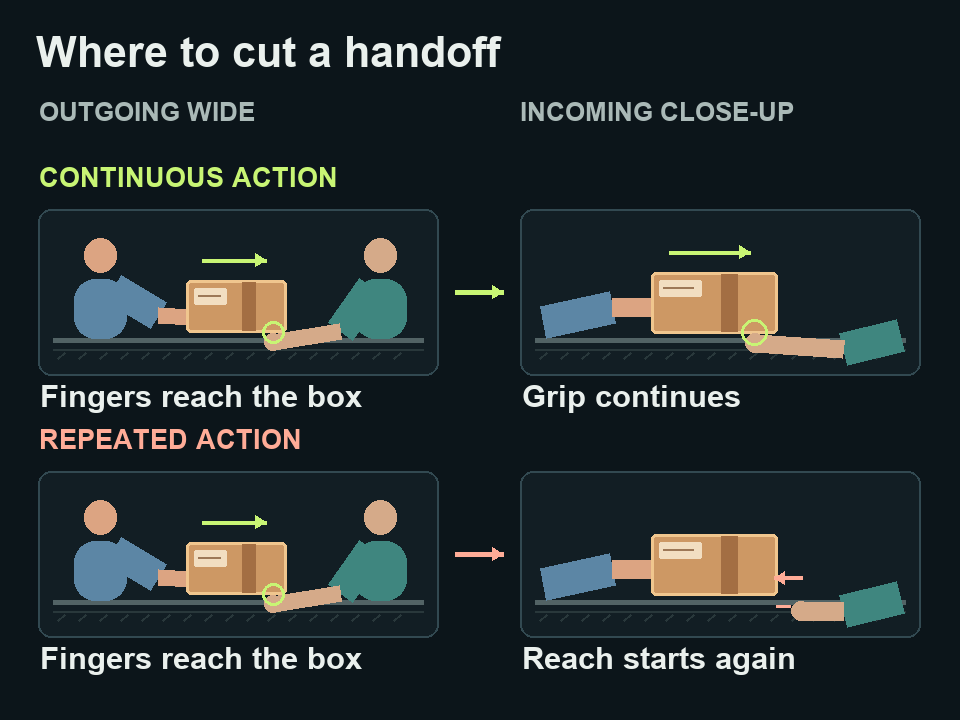
Illustrated handoff. In the lower row, trim the start of the close-up to the first frame where the receiver’s fingers touch the parcel.
Play the join at normal speed with a short lead-in and tail. Then step through the last frame of the wide shot and the first frame of the close-up. Check the top edge of the parcel for a sudden tilt and the shopkeeper’s fingers for a jump in grip. Comparing stills helps spot those differences. Playback tells you whether the parcel moves at a believable speed. Use the frame extraction guide if you need stills for review.
Fix what the viewer sees at the cut
| What you see | What to try |
|---|---|
| The receiver reaches twice. | Advance the start of the close-up to first contact and replay the join. |
| The parcel jumps up between shots. | Find a pair of frames with a closer box height and tilt, or stay wide through the transfer. |
| The box suddenly moves left. | Return to the wide shot to establish positions or use a close-up filmed on the same side of the line. |
| The courier looks at eye level before a cut to the counter. | Use a downward glance or let the wide shot show both people and the parcel together. |
| The tape or label changes when the angle changes. | Use the take that matches the approved parcel. If you still need a close-up, capture it with the same label and tape orientation. |
| The cardboard scrape plays twice or the room goes quiet. | Keep one scrape at the contact point and carry a clean stretch of room tone through the picture cut. |
For AI-generated clips, also inspect the parcel and the fingers through the entire contact beat. A clean pair of frames can sit next to a warped label or a grip that changes as the box moves. If every close-up obscures who took the weight, hold the wide shot for the handoff and use a detail shot afterward.
When planning the scene, put the wide shot, first contact, and release on your video storyboard. Once the cut works in motion, use the video quality control checklist to review the exported file.
For dialogue and reaction shots, use the eyeline match guide to check where each character looks and whether the following shot completes that glance.