
Video Quality Control Checklist Before You Publish
 ReelBoop
Check picture, audio, captions, safe zones, and export settings before posting. Use a 15-second vertical ad to spot common failures and see how to fix them.
Open the exact video file you plan to upload and compare it with the approved brief. Watch it once muted, listen with headphones, then play it in the intended placement’s preview on a phone when available. Log every issue with a timecode and check the new export after each fix. Astorie’s quality control guide for revised commercial shots
Write down what this export needs to do
For this fictional 15-second social ad, show a leakproof mug turning upside down and finish with the words “See the mug.” The project calls for a 1080 × 1920 vertical MP4 with H.264 video at the 30 fps timeline rate and stereo AAC audio. The product name, captions, and end card must be readable in the in-feed preview. The product lead approves the wording and demonstration. The editor signs off on the file and playback. Use your own video brief and the destination’s upload rules to set the requirements for each version.
Run the checklist on the exported file
Start at normal playback speed. Pause at a problem and record the first moment you can see or hear it. Set a result for each row. If you need a platform preview or a client decision to finish a check, leave it pending and name who will follow up.
| Check | Pass for the mug ad | Fail and fix |
|---|---|---|
| Picture and message | The mug is visible at the start, the sealed lid stays visible during the turn, and “See the mug” is readable before playback ends. | The cut skips the moment the mug goes upside down. Hold the shot through the full turn and keep the sealed lid in view. |
| Product and motion | The logo, handle, and lid match the approved reference throughout. The hand keeps a believable grip. | The lid changes shape mid-turn. Replace that take or use approved coverage that still shows the seal. |
| Audio and sync | Speech is clear on phone speakers. The lid click lands as it closes. The mix plays without crackles, abrupt jumps, or clipping. | The music masks “tighten the lid.” Lower the music under that line and check the exported mix again. |
| Captions | Words and product names match the audio. Captions appear with speech and convey meaningful sounds. Text remains readable against the picture. | Auto-captions change the product name. Correct the text, check timing, and preview the result with sound off. |
| Safe zone and crop | The lid, product name, captions, and end card are clear of the controls in the intended placement. | The caption overlaps the interface or the product. Move it and recheck with the actual post copy and any placement add-ons. |
| File and playback | The exported file is 15 seconds, 1080 × 1920, H.264 at 30 fps with stereo AAC. It plays to the end without unintended freezes, black frames, or missing audio. | The export contains an extra second of black. Fix the export range, render again, and reopen the new MP4. |
| Version and approval | The file selected for upload matches the approved filename recorded in the checklist. | A draft with outdated wording sits next to the approved MP4. Identify the approved version by name and use that file for upload. |
If captions are delivered as a separate file, load it in the destination player and verify that it stays in sync and uses the right language. With captions burned into the picture, check timing and contrast on the actual export. W3C’s guidance on captions and meaningful sounds
For an in-feed ad, use the placement’s own safe-zone guide and preview. TikTok’s auction in-feed safe zone, for example, varies with the video shape, ad caption length, and add-ons. Check the opening, any caption near a product detail, and the final card. TikTok’s auction in-feed ad specifications
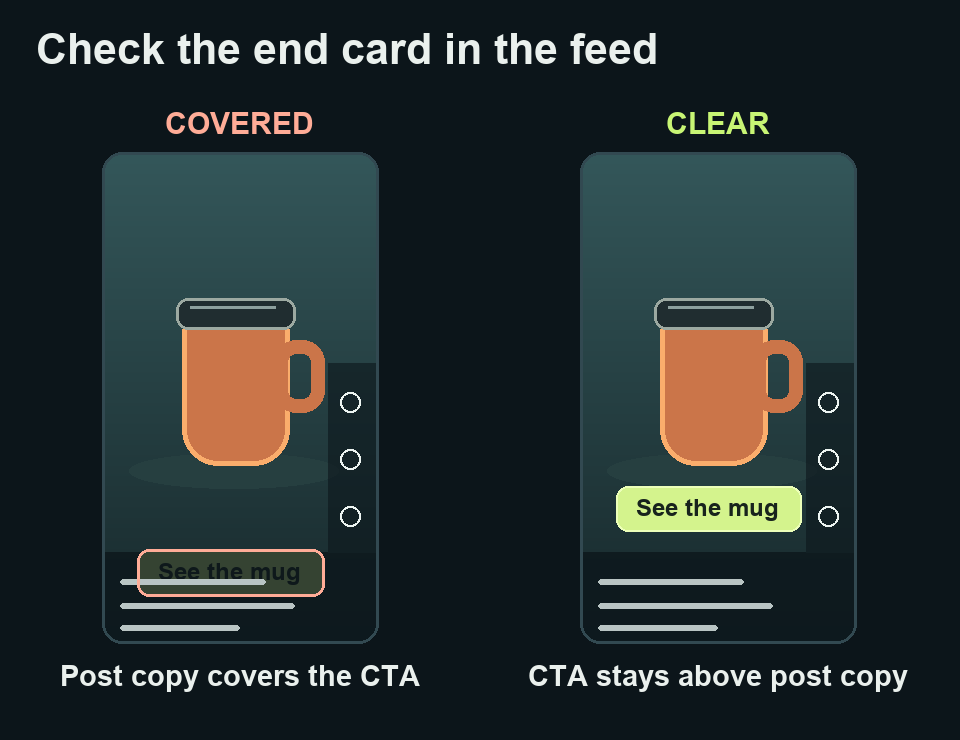
Illustrative feed layout. Check the placement preview to see where the interface overlaps your actual upload.
Record the fix and approve the new file
Write the timestamp, what happened, the fix, and who owns it. For example, 00:12.4–00:15.0 · End card overlaps post copy · Move “See the mug” above the overlay · Editor. Save the new export under its own versioned filename and check that spot in the placement preview. Play the full new file once more and record the approved filename alongside the checklist.
If a shot still feels wrong at normal speed, use the continuity editing guide to compare action and direction around the cut. You can also extract the affected frames to attach precise visual evidence to a review note.
For a changing exposure or color between frames, use the video flicker guide. For a steady cast or a product color that shifts when a look is applied, see color correction vs. color grading.